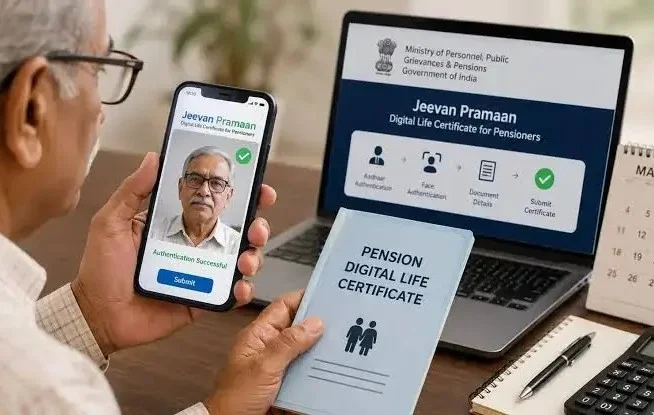
Pensioners no longer need to make repeated visits to banks or post offices to submit their annual life certificates. Through the Government of India’s Jeevan Pramaan service, eligible pensioners can generate a Digital Life Certificate (DLC) using Aadhaar-based biometric authentication. The facility is designed to make pension-related formalities more convenient, particularly for senior citizens and individuals who have difficulty travelling.
A life certificate is an essential document that confirms that a pension beneficiary is alive and eligible to continue receiving pension payments. Pension-disbursing authorities, including banks and other authorised institutions, use this verification to maintain accurate pension records and ensure that payments are released to eligible beneficiaries.
Traditionally, pensioners had to visit their respective pension-disbursing offices in person to submit this document. The digital system offers an alternative by allowing their identity to be verified electronically and the certificate to be stored in a central digital repository. Here’s how the service works, what pensioners need and how they can complete the process.
What Is Jeevan Pramaan and How Does the Digital Life Certificate Work?
Jeevan Pramaan is a government-supported digital service that enables pensioners to submit their life certificates electronically. Instead of submitting a physical document, beneficiaries can complete an Aadhaar-based biometric authentication process to generate a Digital Life Certificate.
The system uses biometric information, such as fingerprints or iris scans, to verify the pensioner’s identity. Once authentication is successful, the Digital Life Certificate is generated and stored in the Jeevan Pramaan repository.
Each successfully generated certificate receives a unique Pramaan ID. The pensioner receives an SMS notification containing relevant certificate details, including the identification number. The concerned pension-disbursing agency can access the certificate electronically, eliminating the need for the pensioner to submit a printed copy separately.
This facility is particularly useful for elderly pensioners, people with mobility limitations and beneficiaries living far from their pension-disbursing branches.
It is important to understand that generating a Digital Life Certificate does not automatically guarantee that pension payments will continue under every circumstance. The pensioner’s records must be correctly registered with the relevant pension authority, and the certificate must be successfully processed by the concerned agency.
Documents, Requirements and Devices Needed to Generate a Digital Life Certificate
Before starting the registration and authentication process, pensioners should keep certain information and technical facilities ready. Missing or incorrect details can interrupt the application process.
The key requirements include:
- Aadhaar number: The pensioner’s Aadhaar details are required for identity verification.
- Registered mobile number: An active mobile number is needed to receive OTPs and certificate-related notifications.
- Pension-related information: Details such as the Pension Payment Order (PPO) number, pension account information, pension-disbursing authority and other required particulars may be requested.
- Aadhaar registration with the pension authority: The pensioner’s Aadhaar details should be registered with the relevant pension-disbursing agency.
- Biometric authentication device: A compatible fingerprint scanner or iris scanner is required for biometric verification.
- Jeevan Pramaan application: The appropriate official application and supporting device drivers must be installed on the computer or mobile setup being used.
Pensioners should obtain the application and supporting software through the official Jeevan Pramaan portal rather than downloading files from unknown websites. They should also ensure that their biometric device is compatible with the application and properly registered before beginning the process.
Step-by-Step Guide to Generate a Jeevan Pramaan Digital Life Certificate
The digital life certificate generation process involves two important stages: registering the biometric device or operator and completing the pensioner’s authentication. The following steps explain the general process.
Step 1: Download the Jeevan Pramaan Application
Visit the official Jeevan Pramaan website and download the appropriate application or software for the device being used. Follow the installation instructions and ensure that all required drivers are installed.
Step 2: Complete Device or Operator Registration
Open the application and complete the required operator or device authentication process. First-time users may need to enter their Aadhaar number and registered mobile number to initiate verification.
Step 3: Verify Details Through OTP
An OTP will be sent to the registered mobile number. Enter the OTP to complete the verification process. The operator may also be asked to provide details such as their name and email address.
After this, select the fingerprint authentication option and scan the operator’s fingerprint using the compatible biometric device. Once verification is successful, the device registration process will be completed.
Step 4: Open Pensioner Authentication
After registering the device, select the pensioner authentication option. Enter the pensioner’s Aadhaar number and mobile number, followed by the OTP received for verification.
The application will then ask for relevant pension information, which may include the PPO number, pension type, pension-sanctioning authority and pension-disbursing agency.
Step 5: Enter Pension Details and Complete Biometric Verification
Carefully fill in all the required pension-related information. Check the details before proceeding, as incorrect information can lead to authentication or processing problems.
Accept the required declarations and select the biometric scanning option. The pensioner’s fingerprint can be scanned using the connected device. If a compatible iris authentication facility is available, that method may also be used.
Step 6: Generate the Digital Life Certificate
Once the biometric authentication is successful, the system generates the Digital Life Certificate. A unique Pramaan ID is assigned to the certificate, and an SMS notification containing the relevant information is sent to the registered mobile number.
The certificate is stored electronically in the Jeevan Pramaan repository, where the authorised pension-disbursing agency can access it.
Step 7: Download or Check the Certificate
Pensioners can visit the official Jeevan Pramaan portal to check or download their Digital Life Certificate. They may need their Pramaan ID or other requested authentication details to access the certificate.
Keeping a PDF copy for personal records is advisable, although a separate physical submission is generally not required when the concerned pension authority successfully retrieves the digital certificate.
Important Things Pensioners Should Know Before Using Jeevan Pramaan
Although the digital facility simplifies the annual life certificate process, pensioners should keep a few important points in mind.
Annual submission requirements: Pensioners generally need to submit their life certificates annually within the period specified by their pension-disbursing authority. November is the usual submission month for many pensioners, but certain categories may have different timelines or applicable extensions.
Successful authentication is essential: Merely entering Aadhaar details does not generate a valid certificate. The biometric verification must be completed successfully before the Digital Life Certificate is created.
Correct pension information matters: Pensioners should ensure that their PPO number, bank details, pension authority information and Aadhaar records are accurate and consistent with the records maintained by the pension-disbursing agency.
Check certificate status: After generating the certificate, pensioners should verify that it has been received and processed by their pension-disbursing authority. They should not assume that an SMS confirming generation necessarily means that every pension-related requirement has been completed.
Alternative submission facilities: Pensioners who do not have access to a compatible biometric device or face technical difficulties can seek assistance from authorised service centres, banks or other permitted facilities. They should check the options available through their pension authority.
Protect personal information: Aadhaar numbers, OTPs, biometric information and pension details should never be shared with unknown individuals. Pensioners should use official websites and authorised applications to avoid fraudulent services.
The Jeevan Pramaan facility offers a convenient alternative to traditional paper-based life certificate submission. By combining Aadhaar-based biometric verification with digital storage and electronic access for pension authorities, it can reduce unnecessary travel and make annual pension formalities easier for senior citizens.
For pensioners who find travelling difficult, the service can be particularly beneficial. However, checking the certificate’s successful generation and acceptance by the relevant pension-disbursing agency remains important to avoid interruptions in pension payments.
Official website: https://jeevanpramaan.gov.in/